
WordPress sends the mail your visitors and customers rely on: order confirmations, password resets, contact form messages. The Email screen tells you whether that mail still arrives and whether receivers can trust it.
It works with the Scanfully plugin: the plugin sends a test message from your site to a Scanfully mailbox at a fixed interval, through WordPress’s own mail function, so it takes the same route as the rest of the site’s mail. Scanfully checks whether each message arrives, looks up the sending IP on public blocklists, and compares the DNS records of your domain with how the messages were authenticated. See Onboarding to connect the plugin.
To open the screen, choose a site and click Email under Monitoring in the site menu.
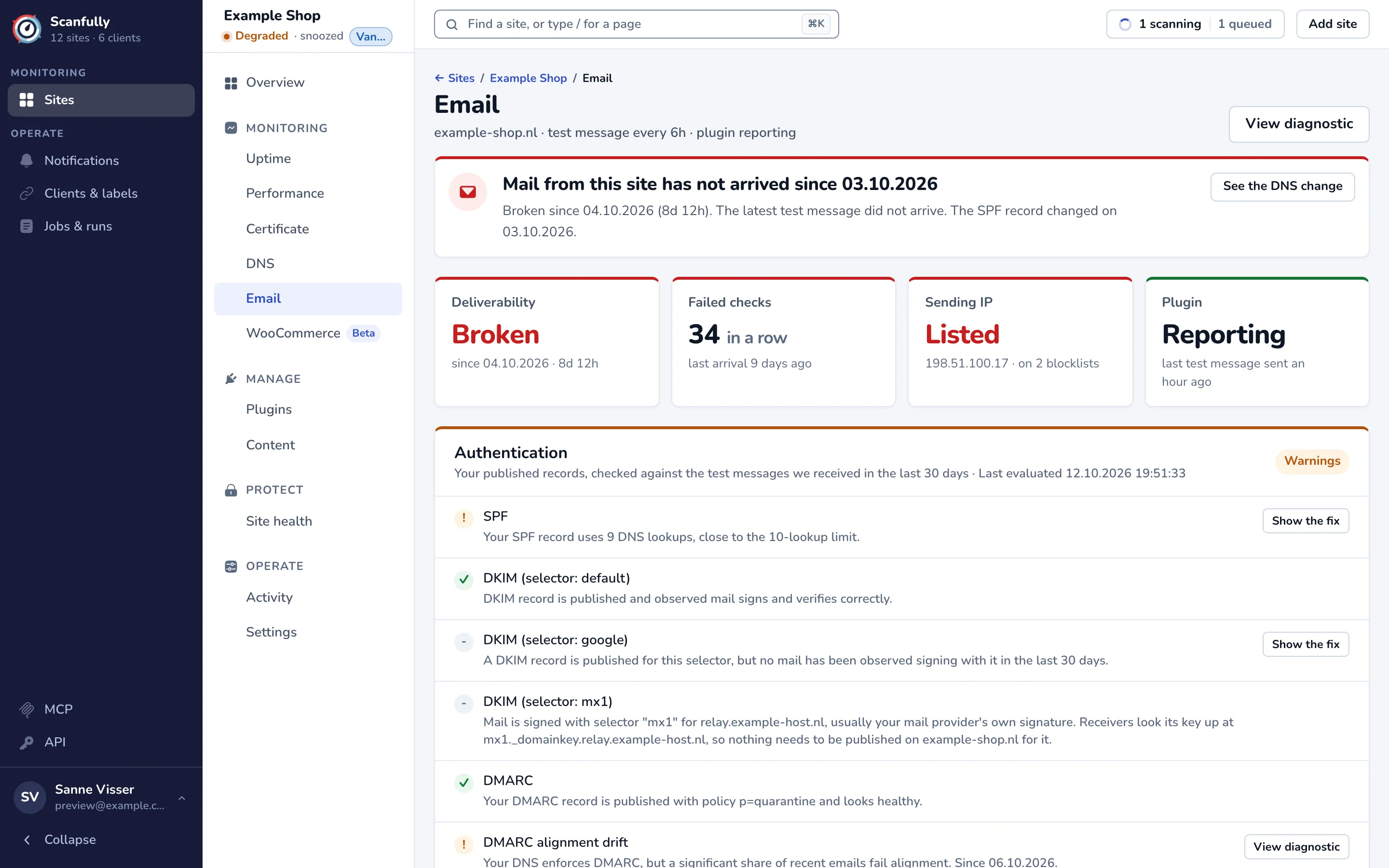
The subtitle shows the domain, how often the plugin sends a test message (for example test message every 6h) and whether the plugin is reporting. View diagnostic opens the email diagnostic.
Until the plugin has sent its first test message, the screen says No test messages yet and only shows the authentication checks.
The headline
Section titled “The headline”The panel at the top tells you the most important thing first:
- Mail from the site is not arriving, since when, and whether an email record in your DNS changed around that time. See the DNS change opens the DNS history.
- The plugin stopped sending test messages: until it reports again, Scanfully cannot tell whether mail arrives. Check that the plugin is still active on the site.
- No delivery result yet: a test message was sent and the result is not in.
- Mail arrives, but the sending IP is on a blocklist, or some authentication checks need a look.
- Mail from this site is arriving. with the time of the last test message.
The cards
Section titled “The cards”- Deliverability: Healthy, Broken with since when, or Unknown while the plugin is not reporting or there is no result yet.
- Failed checks: how many checks in a row found the latest test message missing, and when the last one arrived.
- Sending IP: whether the IP address that sent the latest test message is Clean or Listed on a blocklist Scanfully checks. IPv6 addresses are not checked, because most public blocklists only list IPv4.
- Plugin: Reporting or Not reporting, with when it last sent a test message.
Authentication
Section titled “Authentication”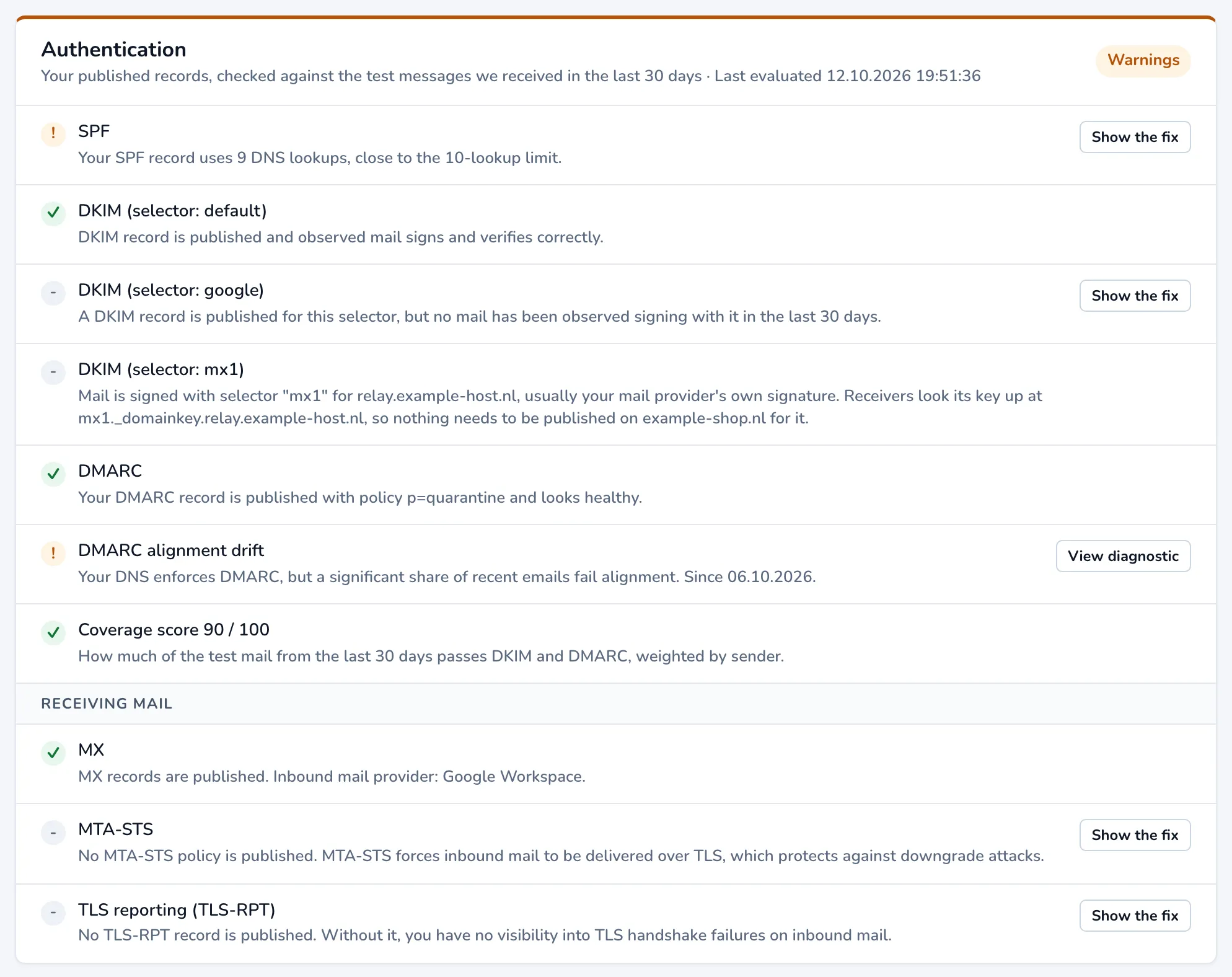
Authentication checks your published DNS records against the test messages that arrived in the last 30 days. The pill at the top right sums it up: Healthy, Warnings or Issues found. Each row says whether that part looks right; when it does not, Show the fix opens what to change.
For mail you send:
- SPF: whether your SPF record exists, is the only one, ends with
~allor-all, and stays within the limit of 10 DNS lookups, and how much of your test mail passes SPF. - DKIM: a row per selector, for example DKIM (selector: default). It says whether the key is published and whether mail signed with it verifies. A selector of your mail provider’s own domain needs nothing on yours.
- DMARC: whether a DMARC record exists, its policy (
p=noneonly monitors), whether it applies to all mail and whether it asks for aggregate reports (rua=). - Drift: whether your published DKIM and DMARC policy still matches the mail that arrives, for example DMARC alignment drift when your DNS enforces DMARC but a large share of recent mail fails alignment. Scanfully checks this once at least 10 DKIM-signed test messages from one domain arrived in the last 30 days. View diagnostic opens the details.
- Coverage score: how much of the test mail of the last 30 days passes DKIM and DMARC, out of 100, weighted by sender.
Under Receiving mail, for mail sent to your domain:
- MX: whether the domain has MX records, and which inbound mail provider they point to.
- MTA-STS: whether a policy forces mail to your domain to be delivered over TLS. Optional, but recommended.
- TLS reporting (TLS-RPT): whether receivers report TLS failures on mail to your domain.
The checks use the latest DNS check of the site; see DNS. After you change a record, Re-check now on the DNS screen picks it up sooner.
Blocklists
Section titled “Blocklists”Blocklists shows the sending IP of the latest test message, checked against public DNS blocklists: Clear on all lists, or a row per list it is on, with Listed since, Last checked and Last successful check. Receivers that use a list can reject mail from that IP or mark it as spam. Removal happens at the list operator: ask your host or mail provider to request it.
Test messages
Section titled “Test messages”Test messages shows when the plugin last sent one (Last sent), when one last arrived (Last arrived), how long it took (Last delivery time), what it was sent through (Sent through) and when Scanfully last evaluated the result (Last evaluated).