
Notification log
The notification log lists every alert your notifications sent, held back or left out, and the daily digests, newest first. Open it with Full log under Recently sent on the Notifications screen.
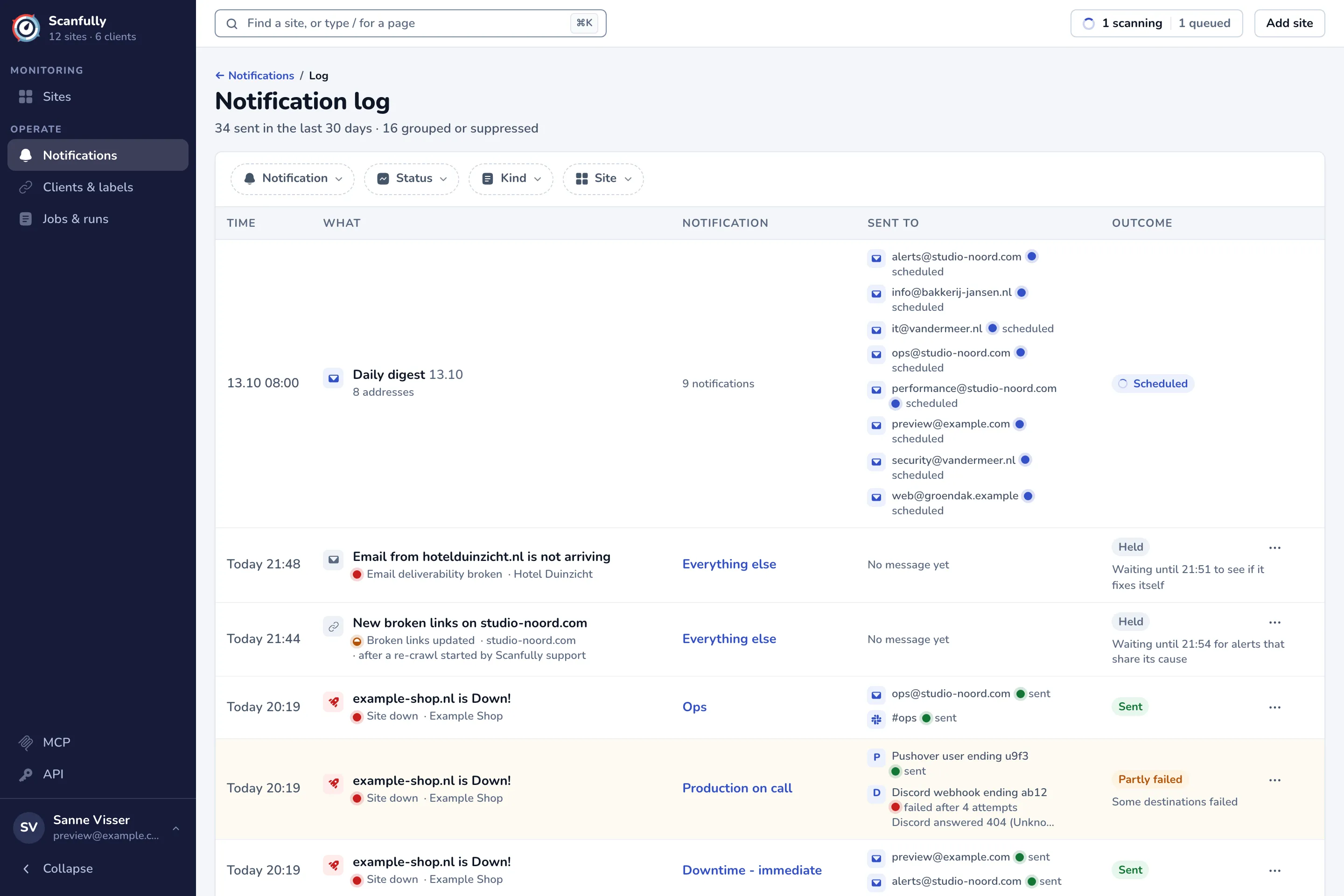
The header shows how many messages went out in the last 30 days and how many were grouped or suppressed.
Filters
Section titled “Filters”- Notification: one notification.
- Status: one or more statuses (see below).
- Kind: Alerts, Recoveries, Tests, Snooze ends and Daily digests.
- Site: one site. Filtered by a site, the log shows that site’s alerts and the digests that cover it.
A link from a daily digest can also limit the log to a period; it shows as a chip you can remove. Clear filters removes them all.
Columns
Section titled “Columns”- Time: when it happened.
- What: the alert’s title, with its event and how loud it is (the dot), the kind (such as Recovery or Test), and the sites. A daily digest shows its date, how many addresses it went to, and how many alerts waited for it.
- Notification: the notification that sent it. A deleted notification keeps its name, marked (deleted).
- Sent to: every destination, such as an email address, a Slack channel, “Discord webhook ending ab12” or “Pushover user ending k2p1”, with how its message went: sent, failed (with the error), retrying, in the daily digest, or skipped with the reason. A message is skipped, for example, when another notification already sent the same alert to that destination, or when the address unsubscribed. For a daily digest, View opens the digest itself (see Daily digest).
- Outcome: the status of the alert, and why it did not simply go out.
Statuses
Section titled “Statuses”- Sent: every destination got it. N grouped means it combined several alerts into one message.
- Partly failed and Failed: some or all destinations did not get it.
- Sending: on its way.
- Held: waiting, for example to see if the problem fixes itself, for alerts that share its cause, while a heavy scan runs, for quiet hours, or for the daily digest. The outcome says until when.
- Suppressed: not sent, because the problem fixed itself before the wait ended, the site was fine once the scan ended, the same alert went out for this site a short while before, or the site was snoozed. A snoozed alert names who snoozed it and until when.
- Dropped: not sent, for example because the notification was switched off or deleted while the alert waited, or because none of its channels could deliver it.
Daily digests can also be Skipped (nothing to report, or no site in scope), Scheduled or Being prepared.
Snooze from the log
Section titled “Snooze from the log”When an alert was held back by a snooze that still runs, Resume ends that snooze. The menu of an alert about one or more sites offers to snooze those sites, for example Snooze example-shop.nl. See Snooze alerts.
How long the log keeps things
Section titled “How long the log keeps things”The log keeps alerts for 13 months and daily digests for 90 days. Click Show older at the bottom for earlier rows.