
How to improve your download content time
Speed is not just a convenience for your website visitors; it’s a gateway to better engagement, higher search engine rankings, and a stronger online presence. In the era of Core Web Vitals, every millisecond counts.
Download Content is one of those metrics that greatly impacts the performance of your website. It’s not necessarily a Core Web Vitals metric, but it does influence a large array of those CWV metrics.
Understanding Download Content Time
Section titled “Understanding Download Content Time”Before you can improve, you need to comprehend what Download Content time entails. Essentially, it’s the duration it takes for the content of a webpage to be downloaded from the server and displayed on your browser.
This metric is crucial for a stellar user experience and is a part of the larger Core Web Vitals initiative by Google, which focuses on loading, interactivity, and visual stability.
How To Measure Download Content
Section titled “How To Measure Download Content”Firstly, let’s measure where you stand. We have two options available to you: the Scanfully dashboard and the Chrome, Edge or Brave inspector.
Scanfully Dashboard
Section titled “Scanfully Dashboard”Scanfully measures it on every performance check as the Download phase: the time to download the HTML of the page. Open the site and click Performance under Monitoring in the site menu. Up to 1000 ms counts as fast, above 4000 ms as slow.
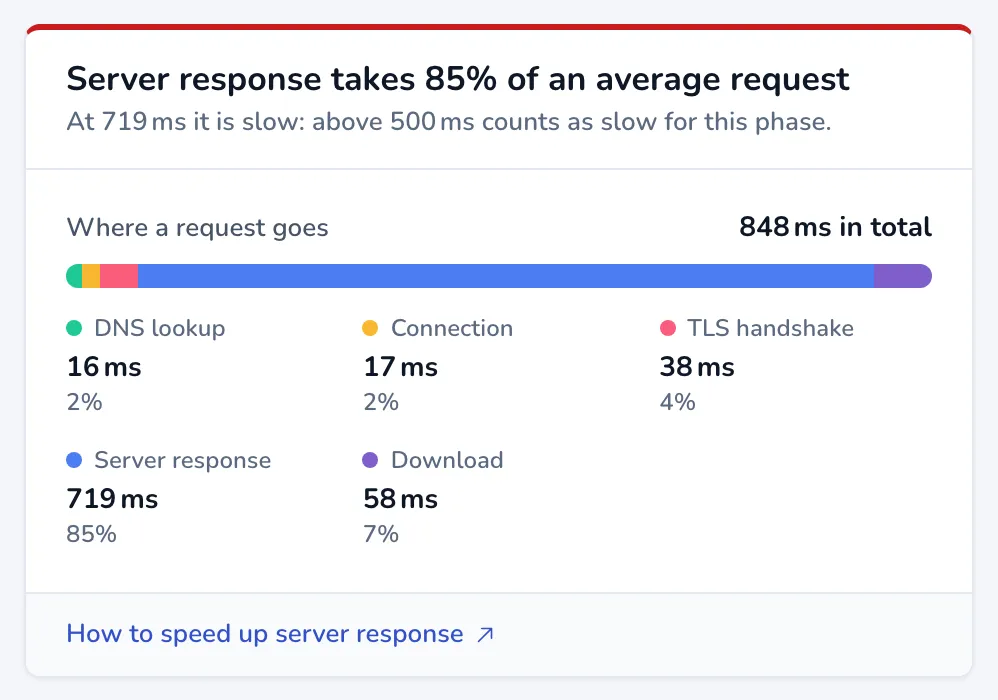
The Download phase shows in Where a request goes, as a line in the Response time chart, and under Phases of this check in Latest check.
Chrome Inspector
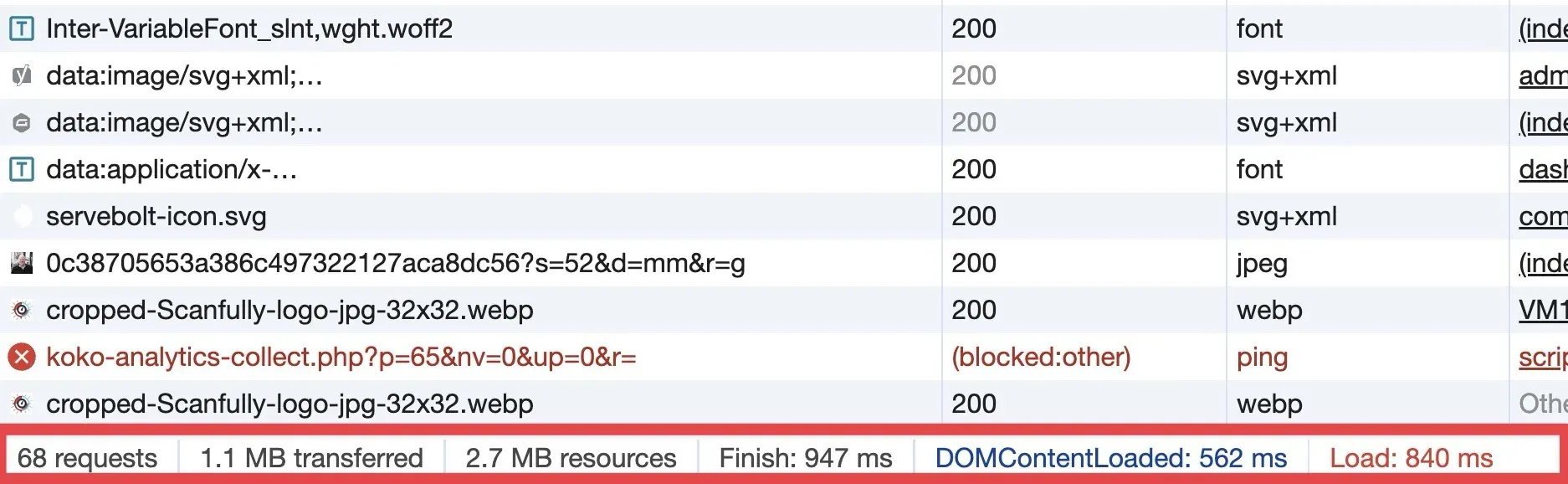
Section titled “Chrome Inspector”Open your website in Google Chrome, right-click, and select ‘Inspect’. Navigate to the ‘Network’ tab. Here, you’ll see a waterfall timeline of your site’s resources as they load. The bar at the very bottom shows the total loading time of the page with all its resources. That is more than Scanfully measures: its Download phase covers the HTML of the page only.
How To Reduce Download Content
Section titled “How To Reduce Download Content”There are essentially three different things that you need to fix if your Download Content is (too) high.
- Reduce delays caused by your infrastructure (Server, DNS, Caching)
- Reduce the amount of uncompressed data being pushed to the browser
- Reduce the amount of data you need to download to a minimum
Server Response Time
Section titled “Server Response Time”Your journey begins with the server response time. A sluggish server response can bottleneck your entire site. Opt for a hosting provider that offers solid performance, particularly one that boasts of optimized server configurations for WordPress.
Very closely connected to this is a fast DNS provider. Learn more about that in our how to improve DNS lookup documentation.
Compression and Optimization
Section titled “Compression and Optimization”Next, let’s dive into resource optimization. Enable GZIP or Brotli compression. You can do this for instance at the level of Cloudflare (Brotli), or in your .htaccess file.
This will shrink the size of your site’s resources before they travel across the web. Additionally, minify CSS, JavaScript, and HTML. These techniques strip unnecessary characters from your code, ensuring a leaner and faster download time.
Utilizing Caching
Section titled “Utilizing Caching”Caching is akin to muscle memory for your website. By implementing caching solutions like WP Rocket or preferably something built in your hosting’s environment you enable your site to remember previously loaded resources. This drastically cuts down subsequent load times.
Integrating solutions like the Speculation API WordPress plugin are also highly recommended.
Content Delivery Networks
Section titled “Content Delivery Networks”Imagine having multiple outposts across the globe, each serving your site’s content. That’s what a Content Delivery Network (CDN) does for you. By distributing your content across numerous servers worldwide, a CDN ensures users receive data from the closest location, speeding up the download process.
Again, Cloudflare is a great solution to add to your site as it handles the CDN function as well. Especially well for any of the paid plans like Pro or Business.
Image Optimization
Section titled “Image Optimization”Images often account for the bulk of download content time. Compress them without sacrificing quality by using tools like Imagify, Smush or ShortPixel. Also, consider lazy loading images, which only loads pictures when they’re about to enter the viewport.
Reduce External Scripts
Section titled “Reduce External Scripts”External scripts, such as ads, font loaders, and analytics, can significantly impact your Download Content time. Evaluate each script’s necessity. If they’re crucial, explore async and defer attributes to minimize their performance impact.
Monitoring Changes
Section titled “Monitoring Changes”Finally, after implementing these optimizations, keep a close eye on your site’s performance. The Performance screen shows the Download phase over time; Compare to last period shows whether your changes made a difference.
Conclusion
Section titled “Conclusion”Improving your WordPress site’s Download Content time is a journey of attention to detail and continuous tweaking. By focusing on server response, optimizing resources, and employing the right tools for the job, you can offer visitors a lightning-fast experience that Google and users will love.