
Email diagnostic
The Email diagnostic goes one level deeper than the Email screen. It shows, per sender domain, how many of the test messages from your site passed DKIM, SPF and DMARC when they reached the Scanfully mailbox. Use it when the Email screen reports drift or a low coverage score and you want to know which sender causes it.
To open it, click View diagnostic at the top of the Email screen, or on a drift row in its Authentication panel.
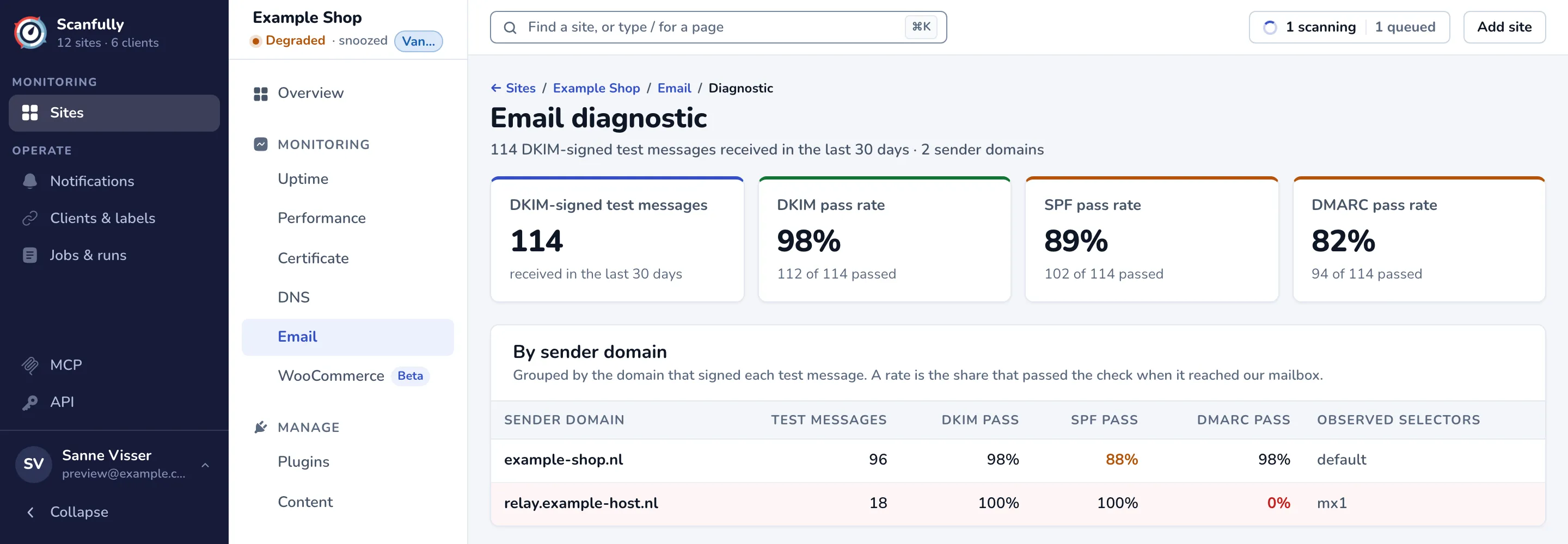
Only test messages that carry a DKIM signature count here. They are grouped by the domain that signed them.
The cards
Section titled “The cards”- DKIM-signed test messages: how many arrived in the last 30 days.
- DKIM pass rate, SPF pass rate and DMARC pass rate: the share of those messages that passed each check, with the counts below. 95% or more is fine, under 50% fails.
By sender domain
Section titled “By sender domain”The table has a row per signing domain: Sender domain, the number of Test messages, DKIM pass, SPF pass and DMARC pass in percent, and the Observed selectors (the DKIM selectors those messages were signed with). A rate that needs attention is coloured; a row with a failing rate is tinted red.
A common case is a second sender domain that belongs to your host or mail provider, such as a relay. Its messages may pass DKIM for its own domain but fail DMARC for yours, because the signature does not align with your domain. Set up DKIM signing for your own domain with that provider, or send through a service that signs for your domain.
When no DKIM-signed test message arrived in the last 30 days, the screen says so and links back to the email status.